Saturday, January 30, 2016

The computer monitor to buy

Recently I need to buy a large monitor, I did some research on current monitors and narrowed down my choice to Acer R240HY for:
  • IPS for accurate color and wide view angle.
  • Matte, no reflection.
  • Super thin bezel, < 6mm (1/4"), really cutting edge technology.
  • Not PWM, virtually flick-free.
  • Super low cost, $130 on Amazon and $99 refurbished by Acer on ebay
  • For gamers: 4ms response time and overclockable to 75Hz.

I ordered a refurbished one from Acer on ebay for $99, it arrived after about a week via FedEx ground. Looks like brand new to me, no dead pix. Vivid color, sharp, contrasty and bright (I adjusted brightness all way down to 0%). These photos are against a Thinkpad X220 that also has a matte IPS screen. As you can see, they look very close.


Two alternatives:
  • Dell U2414H. The UltraSharp series are calibrated in factory for the most accurate sRGB color reproduction. Its anti-reflection coating is less matte than usual for better photography. It is often on sale for $150 on Dell Outlet. U2415 is almost identical with a 16:10 ratio @1920x1200, much better than 16:9.
  • ASUS VN248H-P. It is often on sale for $109, with built-in (poor) speakers. It is PWM and its seat wobbles.

Saturday, January 23, 2016

Fighting Nexus 6 for battery life

Ever since I got this phone, I've been struggling with its inconsistent battery drain. The phone may stay cool for a while but then suddenly become hot with a sharp battery drop. This happened while it was left on a steady table or in my pocket while browsing in a local store.

No surprise, the top battery drain was Google Services, they kept the phone awake all the time:


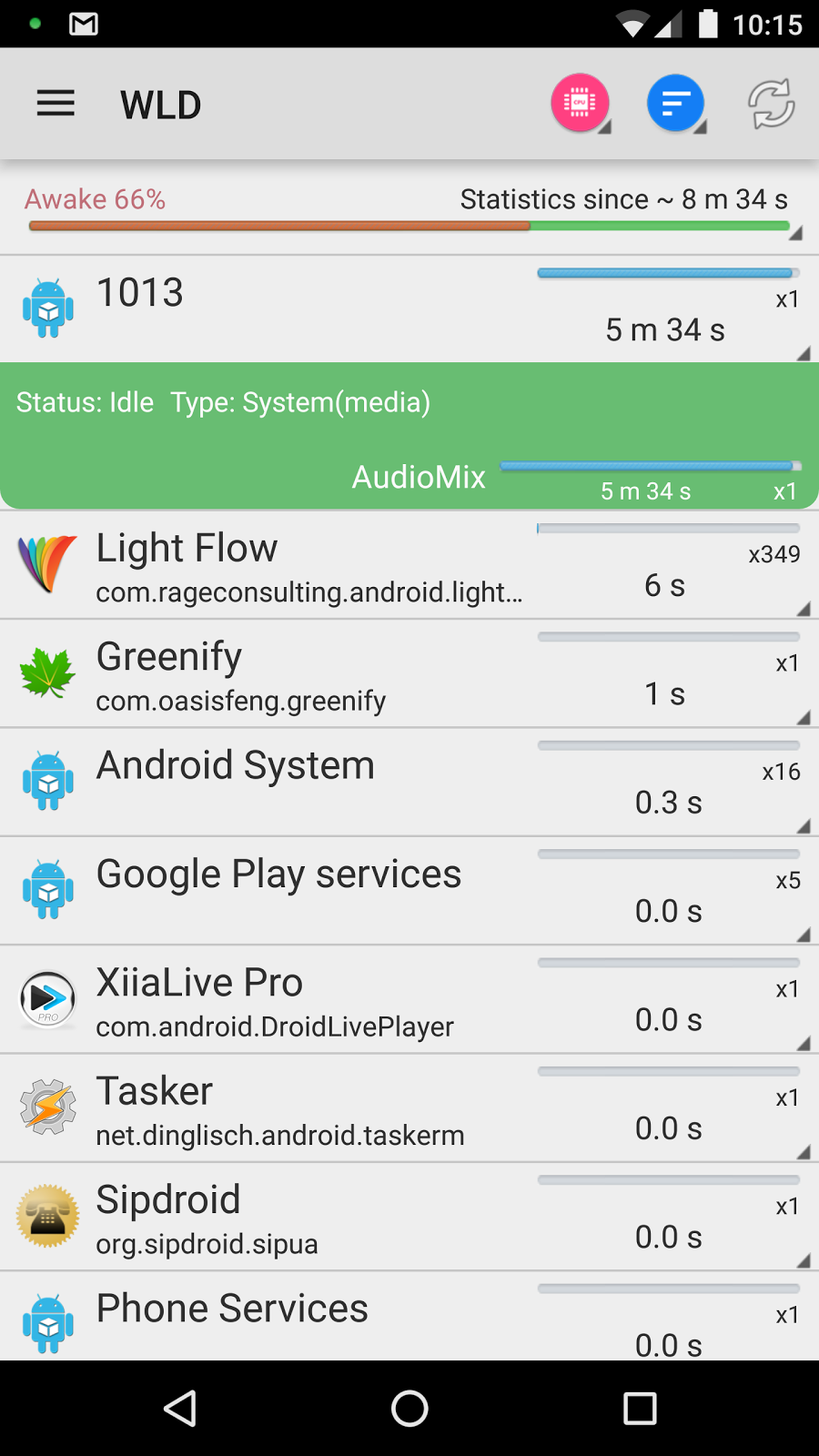
So I installed Wakelock Detector (don't install it as a system app!) to see what was going on and it obviously had something to do with Checkin, SystemUpdateService and Eventlog:


I cannot simply disable Google Services because I rely on GCM for GMail and GoogleVoice sync, so I had to do the following things to deal with it.

(Re)move some built-in apps

The /system folder has 0 space left out of box. So first thing first is to remove or move out some stuff from this folder to free up some space for system-level hacks. Other than removing, I moved these apps to /data/local, then I can move them back just in case the phone won't start up (in TWRP with its file manager):

/system/app: Books, Chrome, CloudPrint2, Drive, EditorsDocs, EditorsSheets, EditorsSlides, FitnessPrebuilt, GoogleContactsSyncAdapter, GoogleEars, Hangouts, Music2, Newsstand, PlayGames, PlusOne, PrebuiltKeep, PrebuiltNewsWeather, talkback, Videos

/system/priv-app: CallLogBackup, GCS, GoogleBackupTransport, GoogleFeedback, GoogleOneTimeInitializer, MusicFX, SetupWizard

Don't move those that you do need, for example, Drive or GCS, if you do need Google Drive for cloud storage or Project Fi for voice/data service.

Needless to say, without these garbage, the phone becomes more responsive and cooler with less battery drain.

Autostarts

I installed this app from F-Droid, search for Checkin, Eventlog and SystemUpdateService, respectively, and disabled all the occurrences:


Right after done this, Google Services no longer appear in the top battery drain list! With such a great success, I went further and disabled unnecessary intents and receivers for other apps such as YouTube etc. For example, players like Tunein and TV Plus do not need to be started automatically after a reboot nor react to network changes, but do need to react to headphone buttons and widget clicks:


Greenify

Now these apps no longer starts by themselves, but after we, say, watched TV, we still want them to be closed. This is what Greenify comes handy.


Xposed

In Wakelock Detector, I noticed that WeChat generated too much wakelocks. There are several apps can block wakelock request from an app, such as No Wakelock and Advanced Permission Manager. They are very straightforward to use. However, they cannot block some wakelocks by unknown system processes. I need to deal with such system wakelocks, so I installed Xposed. The ones for Nexus 6 6.0.1 are "XposedInstaller_3.0_alpha4.apk" and "xposed-v79-sdk23-arm.zip".

Per App Hacking

I use it to block wakelocks from WeChat and other apps. Yes, WeChat still works fine without delaying outbound and inbound messages. I also prevented YouTube from service.


Amplify

In Wakelock Detector, I also noticed some horrible wakelocks from unknown system processes, such as *net_scheduler*. This crap may show up anytime, even at midnight. Yes, I already greenified YouTube but Google Play Service will still launch it at anytime it wants:


While listen to music, online or offline, AudioMix and AudioOffload keep my phone staying awake:


I use Amplify to block them all (except *net_scheduler*), plus ConnectivityService that runs my phone hot whenever network status changes (e.g. between 3G and 4G), by allowing them every 9999999 seconds:


Now the phone runs totally cool without being awakened and drained by crappy google services while playing my music and keeping voice calls (Sipdroid), GMail, GoogleVoice and WeChat messages pushed in in time. The phone almost never go out of deep sleep (only 2% awake) with only 2% battery drop overnight, which is a phone ought to be in the first place:


In summery: Google added way too much garbage into this Nexus phone that's supposed to be pure and clean without garbage from carriers and manufacturers. The phone can drain battery at a fast rate at anytime even at midnight. Just Greenify alone is not enough, we must use Wakelock Detector to find out those unwanted activities and block them with Autostarts, Per App Hacking and Amplify. Don't simply disable any service, it does nothing but causing unwanted side effects.

As a side note, my phone runs on the latest 6.0.1 (shamu-mmb29s) and the so called doze mode does not help. Because, for doze to kick in the phone much stay steady for an hour and Google Play Service is one of the two apps that are excluded from doze restrictions.

Related articles:
Nexus 6 case mod
This is phone cases ought to be
Tweaks for nexus 6
Free ringplus, what's the catch?

Wednesday, January 20, 2016

Nexus 6 case mod

Before:
After:

Cooler, especially during turbo charging, lighter (0.5 vs. 1.0 oz) and less slippery.

Tuesday, January 12, 2016

This is phone cases ought to be

I never understand why almost all phone cases are so thick, bulky and heavy. Totally unnecessary, and insanely expensive in local stores. I can only take something like this from Dollartree:


Notice that it is called "cell phone bumper", so I searched it on Amazon for my Nexus 6 and found two:

LJSGK Protective Aluminum Alloy Bumper Frame Case

Slim Armor Border Shockproof Bumper Frame Case Cover

I wish I bought one of these. I'm going to drill some more big wholes on the one I bough to make it cooler and lighter:


So sad, cannot find one for LG Volt

Thanking to sam888, ordered two of these on ebay:


[update 01/30/16] Received above cases from China and extremely happy! Super thin, 0.8mm, and light, 0.5 oz, and protects fully the phone. In comparison, the Spigen crap is 1.3mm thick and 1 oz heavy, and still leaves the up and down sides of the phone unprotected.

Use Remote Desktop on the phone?

Only one app is still usable and it is great, Ericom AccessToGo RDP, and it is free.

I tried many, but all do not work. For example:
  • Microsoft Remote Desktop - keyboard does not work in Xming.
  • 2X Client RDP - only 8-bit color.
  • Remote RDP and many others found in Play store- crash after any swipe.
This short video shows how easy it is to configure AccessToGo:

Saturday, January 9, 2016

Tweaks for Dolphin browser

Dolphin is currently the only web browser I can use on my phones. I used to use Boat, but it became worse and worse and, the deal break, it no longer do text reflow (or text wrapping) since KitKat. Dolphin used to be not so good compared to Boat; it uses much more CPU and runs phones hot, but still far less so than other browsers such as Chrome and UC.

Must-have tweaks for Dolphin:
  • Enable Dolphin Jetpack. Otherwise text reflow won't be available.
  • In Gesture and sonar, uncheck Shake to activate. This feature is very troublesome.
  • Change search engine to Google. The default Yahoo sucks.
  • Check Always show address and menu bar.
  • Change User agent to iPad, it works for most sites. If you find a site does not work, try set user agent to Android or Desktop. You can easily swap between them by swiping from the right side and click on the "Desktop" icon.
  • Check open previous tab on startup.
  • Check Auto-fit pages. This is text reflow or wrapping.
  • In Page zoom, uncheck Open pages in overview. This thing starts with the first iPhone and I never understand why anybody want this crap - must double-tap on each and every page you open.
See this short video to go through all the major settings:


Friday, January 8, 2016

Tweaks for Nexus 6

For $200-250, Nexus 6 is currently the best value as a global phone that works on Verizon, Sprint, AT&T, T-Mobile and in virtually all countries including China. Before, I use Verizon phones as global phones, but they do not work on Sprint network.

Root

The first thing is root, because many essential tweaks require it. To root it, the bootloader must be unlocked first. I first took all the OTA updates to update it to the latest 6.0.1, then unlocked it and root it.

Debloat

As always, I disabled everything I could on the phone, then used Debloater to disable these junk, mainly from carriers and google:

Processing changes to:  com.android.calllogbackup  -> Status is now hidden
//Processing changes to:  com.android.carrierconfig  -> Status is now hidden
Processing changes to:  com.google.android.backuptransport  -> Status is now hidden
Processing changes to:  com.google.android.feedback  -> Status is now hidden
Processing changes to:  com.google.android.onetimeinitializer  -> Status is now hidden
Processing changes to:  com.android.sprint.lifetimedata  -> Status is now hidden
Processing changes to:  com.android.managedprovisioning  -> Status is now hidden
Processing changes to:  com.google.android.setupwizard  -> Status is now hidden
Processing changes to:  com.android.sharedstoragebackup  -> Status is now hidden

//Processing changes to:  com.android.sdm.plugins.sprintdm  -> Status is now hidden
Processing changes to:  com.google.android.marvin.talkback  -> Status is now hidden
Processing changes to:  com.vzw.apnservice  -> Status is now hidden   


Don't check the items remarked with "//" if you need to update Sprint PRL and data profile.

Double-tap to wake

Not only convenient, it also saves the power button. Just install this app and enable this fantastic feature. Now, how to put the phone into sleep without pushing the power button? Easy, install the Lock Screen app by WangQi. At this moment, you might want to disable the "Ambient display" crap.

Use a black wallpaper

It saves battery for an AMOLED screen.


Don't use the stock charger

With the charger that comes with this phone, charging is very fast - 15 minutes for 6 hours play. What you pay for that is heat that is always a very bad thing to electronic parts, especially the battery and screen. So, don't charge for more than 15 minutes or use a different charger. No, using a thin cable won't slow it down.

Reduce CPU speed

This phone has a really fast CPU, but it runs phone hot and hurts battery life. I use SetCPU to limit the max frequency to 1190 (other values might not actually work). Another big battery eater is the stupidly high resolution screen, the only thing we can do about it is to use night mode in Dolphin.


Enable notification LED

Simply install Light Flow (paid version) and follow this guide.


There are only stupid thing left is the ugly white Google search bar. I know I can use a 3rd party launcher but I don't want to for the obvious reason - Android is already a mess and I don't want to add even more like all the phone manufacturers do.

[update] Flashed to 5.1.1 (shamu-lmy48y) and got everything working fine. Then flashed to 6.0.1 (shamu-mmb29s). This time I did not use Debloater, only disabled some non-system apps that I don't use such as Chrome, Fit, Docs etc. So far it has been a smooth sailing.

Related articles:

Fighting nexus 6 for battery life
This is phone cases ought to be
Nexus 6 case mod