You may find newer articles here:
https://www.kots.us
Wednesday, August 7, 2019

Friday, June 8, 2018
Uploading a photo and get the URL
On a computer, nothing is easier than snag.gy. Just open your photo in Paint, press ctrl-A, ctrl-C, then open snag.gy. You may also upload a screen capture by press the PrintScreen key or Alt-PrintScreen.
On a phone, I found the easiest is to use imgbb.com. Once you uploaded the photo or screen capture to imgbb, touch on the image icon, the uploaded photo will be opened. Touch and hold on the opened image and you get the URL.


On a phone, I found the easiest is to use imgbb.com. Once you uploaded the photo or screen capture to imgbb, touch on the image icon, the uploaded photo will be opened. Touch and hold on the opened image and you get the URL.


Monday, March 26, 2018
The new Firefox, finally a good web browser!
After decades, Firefox finally released a totally new version last year. No more unacceptable javascript handling and memory management, finally.
Now, for the first time in history, I can run Firefox and some other memory-hog programs together. This screen shot shows Firefox and Android Studio, no more crash due to memory leak from Firefox.

If you are not so convinced, you may try the portable version first. It won't overwrite your current Firefox. What I've been doing, though I have to close one to use the other. To tell you the truth, I have not touched the old version for at least 2 months.
A must tweak is to block annoying ads that also consume lots of resources. After trying many of them, the uBlock is the one that does not use lots of CPU and memory like Adblock and AdGuard etc. And it is very fast loading pages, so fast that I cannot see any sign of ad-blocking process which I can with other such add-ons.
I also add this great add-on to Yandex on my phone and tablet. Not only clean and quiet, Yandex now is also extremely smooth and fast. Yandex is the only browser I found acceptable for phones and tablets, and I can really use it to do what I do with Firefox on my computer.
You can copy and paste the following list into your uBlock filter, to block those annoying content found on some Chinese sites (6park etc.). In addition, check "CHN: EasyList China (中文)".
www.bassresource.com##DIV[id="om-c6ckhspxn06fcreu"][class="baltimore-background baltimore-c6ckhspxn06fcreu baltimore-optin-visible baltimore-has-image baltimore-lightbox baltimore-transparent"]
www.mitbbs.com##MARQUEE[class="marquee"]
www.6park.com##MARQUEE
site.6parker.com##DIV[id="scrollWrap"]
Now, for the first time in history, I can run Firefox and some other memory-hog programs together. This screen shot shows Firefox and Android Studio, no more crash due to memory leak from Firefox.

If you are not so convinced, you may try the portable version first. It won't overwrite your current Firefox. What I've been doing, though I have to close one to use the other. To tell you the truth, I have not touched the old version for at least 2 months.
A must tweak is to block annoying ads that also consume lots of resources. After trying many of them, the uBlock is the one that does not use lots of CPU and memory like Adblock and AdGuard etc. And it is very fast loading pages, so fast that I cannot see any sign of ad-blocking process which I can with other such add-ons.
I also add this great add-on to Yandex on my phone and tablet. Not only clean and quiet, Yandex now is also extremely smooth and fast. Yandex is the only browser I found acceptable for phones and tablets, and I can really use it to do what I do with Firefox on my computer.
You can copy and paste the following list into your uBlock filter, to block those annoying content found on some Chinese sites (6park etc.). In addition, check "CHN: EasyList China (中文)".
www.bassresource.com##DIV[id="om-c6ckhspxn06fcreu"][class="baltimore-background baltimore-c6ckhspxn06fcreu baltimore-optin-visible baltimore-has-image baltimore-lightbox baltimore-transparent"]
www.mitbbs.com##MARQUEE[class="marquee"]
www.6park.com##MARQUEE
site.6parker.com##DIV[id="scrollWrap"]
Monday, March 19, 2018
Tweaking OpenVPN again
My latest tweaks for OpenVPN is very simple, just add these few lines to the server configure file:
txqueuelen 5000
tcp-nodelay
sndbuf 0
rcvbuf 0
push "sndbuf 174760"
push "rcvbuf 174760"
And add this line to /etc/rc.local on the server, somewhere before "exit 0":
ifconfig venet0 txqueuelen 10000
Replace venet0 with eth0 etc. if necessary, you can find it out with the ifconfig command. That's all.
The default txqueuelen values are way too small, 100 and 1000, for OpenVPN and Linux OS for today's network bandwidth. I saw lots of dropped packets (again, using the ifconfig command). My OpenVPN is used over LTE/4G mobile network, 5000 is enough. My Linux server is on a 10 Gigabit Ethernet, 10000 is about right. The network is significantly smoother than before. My OpenVPN uses TCP protocol, not UDP.
The "tcp-nodelay" option is good for reducing latency, a good thing for VoIP and gaming.
By setting the buffers to 0, OpenVPN will let the OS do the job. The default values are way too small. This is the major boost to speed, from 5Mbps to 20Mbps.
Why not push 0 to clients for sndbuf and rcvbuf? Because old versions of OpenVPN clients will really set these buffer sizes to 0, i.e., no buffer at all, resulting to crawling speed! So, unless all clients can be upgraded, don't do that. For LTE/4G, 174760 does well.
txqueuelen 5000
tcp-nodelay
sndbuf 0
rcvbuf 0
push "sndbuf 174760"
push "rcvbuf 174760"
And add this line to /etc/rc.local on the server, somewhere before "exit 0":
ifconfig venet0 txqueuelen 10000
Replace venet0 with eth0 etc. if necessary, you can find it out with the ifconfig command. That's all.
The default txqueuelen values are way too small, 100 and 1000, for OpenVPN and Linux OS for today's network bandwidth. I saw lots of dropped packets (again, using the ifconfig command). My OpenVPN is used over LTE/4G mobile network, 5000 is enough. My Linux server is on a 10 Gigabit Ethernet, 10000 is about right. The network is significantly smoother than before. My OpenVPN uses TCP protocol, not UDP.
The "tcp-nodelay" option is good for reducing latency, a good thing for VoIP and gaming.
By setting the buffers to 0, OpenVPN will let the OS do the job. The default values are way too small. This is the major boost to speed, from 5Mbps to 20Mbps.
Why not push 0 to clients for sndbuf and rcvbuf? Because old versions of OpenVPN clients will really set these buffer sizes to 0, i.e., no buffer at all, resulting to crawling speed! So, unless all clients can be upgraded, don't do that. For LTE/4G, 174760 does well.
Thursday, February 22, 2018
Keep Oral-B always in full power
If you are an Oral-B user, you should have noticed that the brush becomes not so powerful if it is fully charged - after the green light is off.
So I use a timer to charge it only before and after the time I use it. For example, I brush around one o'clock at night so I set it to start charging at 10PM and turn it off at 2AM. About 4 hours. Similar for the morning, for another 4 hours.
Then I simply leave it in the charger all the time after each use. This way, the brush is still being charged when I use it and it is always in its full wings.
Depending on how many minutes you brush every time, you may set the total charging time anywhere from 5 to 10 hours. The key is to give it enough time to charge but never be fully charged before you use it. I brush for about 5 minutes each time and 4 hours (8 hours per day) is about perfect.
So I use a timer to charge it only before and after the time I use it. For example, I brush around one o'clock at night so I set it to start charging at 10PM and turn it off at 2AM. About 4 hours. Similar for the morning, for another 4 hours.
Then I simply leave it in the charger all the time after each use. This way, the brush is still being charged when I use it and it is always in its full wings.
Depending on how many minutes you brush every time, you may set the total charging time anywhere from 5 to 10 hours. The key is to give it enough time to charge but never be fully charged before you use it. I brush for about 5 minutes each time and 4 hours (8 hours per day) is about perfect.
Saturday, December 30, 2017
Battery replacement for Japanese rice cookers
The battery in some Japanese rice cookers will run out in about 10 years. Unfortunately this battery is solder-on and thus not replaceable by the user. Therefore I had to desolder the old battery and mount a 2-AAA battery holder. From now on, the two AAA batteries should last forever. If they somehow will run out again, it is very easy to replace.
Wednesday, December 13, 2017

Friday, December 1, 2017
Final fix for water in canister
If your Toyota or Scion car has check-engine light on after driving in heavy rain, you may watch this videos for diagnosis (ignore the condom part, no need to do that, because water did not get in from there, see the correct fix at the bottom of this page):
And this video for purging water out of the canister pump module:
For the permanent fix, block the small holes under the gas-feed inlet (take off the rear tire at the driver side and look up):


And this video for purging water out of the canister pump module:
For the permanent fix, block the small holes under the gas-feed inlet (take off the rear tire at the driver side and look up):


Tuesday, November 21, 2017
Piaggio/Vespa scooter regulator test and replacement
The battery on my Piaggio LT150 is no longer charged while riding. It took me quite a while to figure out how to access the charging unit, turned out to be quite easy as showing in this video:
This video also shows how to test the regulator, replace it and mount everything back.
This video also shows how to test the regulator, replace it and mount everything back.
Friday, July 7, 2017
How to make headphones comfortable
It is summer time, your headphones become hot and sweaty. Here comes the fix:
Thursday, June 29, 2017
The best version of Yandex
17.1.2.339. Older versions cannot block some sites' pop up ads, such as 6park.com, and no option to save passwords for many sites. Newer versions have the tableau totally messed up.
Yandex
[in Chinese]
老的版本不能阻挡一些网站的恶性弹出广告,比如6park.com,很多的网站也不提示密
码保存。新的版本呢,常去网站的标签一塌糊涂,名不相符。
我衷心感谢Yandex终于做了一个在手机和平板上真正能替代桌面电脑的浏览器。从用PDA那
时候开始,我就一直梦想这么个浏览器。我现在很少带电脑出门了,因为这下手机上都可以做了。
Yandex
[in Chinese]
老的版本不能阻挡一些网站的恶性弹出广告,比如6park.com,很多的网站也不提示密
码保存。新的版本呢,常去网站的标签一塌糊涂,名不相符。
我衷心感谢Yandex终于做了一个在手机和平板上真正能替代桌面电脑的浏览器。从用PDA那
时候开始,我就一直梦想这么个浏览器。我现在很少带电脑出门了,因为这下手机上都可以做了。
- 能无极缩放,又能自动满行,还有阅读模式。
- 能记住所有网站的密码。当然你也可以选择不记。
- 支持所有的电脑上的Chrome和Opera的插件,也就是这个浏览器无所不能。
- 页面整洁,不像Chrome和UCWEB里的有些字太大、有些字又太小。
- 看Youtube没有广告(不需要安装任何插件),自动全屏。
- 不像UCWEB和Chrome那样发热耗电。
- 写了一半的帖,reboot后都还在,一字不漏。
- 地址栏在下面,很贴心(平板时还是在上面)。
Wednesday, June 21, 2017
Two big problems with Le S3
Encountered two big issues with the Le S3:
1) No android.net.conn.CONNECTIVITY_CHANGE broadcast, apps are not aware of network changes, such as register loss of SIP after switching from WiFi to mobile data or vice versa.
2) No setExactAndAllowWhileIdle(), apps cannot do things periodically, such as register of SIP every 15 minutes.
The result is: communication-based apps become totally unreliable. Seems a general issue of such Chinese phones.
[Solution] Install the unofficial LOS 13.
[In Chinese]
一是没有android.net.conn.CONNECTIVITY_CHANGE广播。没有这个广播,apps无法知道
网络有没有变化。自Android 5.0一来,这个广播总是乱广播、误广播,所以我在我自
己的app里对这个广播做仔细的过滤。我能理解乐视的工程师为什么要这么干,但是这
是典型的中国式的不守规矩,在美国不能也这么干的。
二是没有setExactAndAllowWhileIdle()。没有这个,apps无法定时做一些事情。比
如Sipdroid每15分钟要注册一次,就没法子了。我也能理解在流氓软件遍地的中国,为
什么乐视的工程师要这么以流氓的方式对付流氓,但是你在美国卖这个手机,就不能这
样耍流氓。
这里一位老兄也遭遇到了这些问题,他说中国的手机大多都这么干:
https://stackoverflow.com/questions/40931966/android-alarmmanager-setexactandallowwhileidle-and-wakefulbroadcastreceiver-no
需要用手机干正经事的,还是不能买这些国产手机。Axon 7我没有真正使用过,不知道
是不是也是这样,多半没有,因为中兴和华为已经在美国卖了很多年的手机了,应该没
有这么重的流氓习气。
对于不是码农的普通用户来说,结果是网络活动不牢靠,比如微信和邮件不能及时推送
到手机上,Hangouts之类的漏电话,定时的事件不会按时发生。。。好处是省电,类似
于苹果那样的流氓加恶霸式的强行关后台。
是的,我已经在电池管理里面折腾过了,没效果。
【解决办法】刷unofficial LOS 13,一切问题都没有了。
1) No android.net.conn.CONNECTIVITY_CHANGE broadcast, apps are not aware of network changes, such as register loss of SIP after switching from WiFi to mobile data or vice versa.
2) No setExactAndAllowWhileIdle(), apps cannot do things periodically, such as register of SIP every 15 minutes.
The result is: communication-based apps become totally unreliable. Seems a general issue of such Chinese phones.
[Solution] Install the unofficial LOS 13.
[In Chinese]
一是没有android.net.conn.CONNECTIVITY_CHANGE广播。没有这个广播,apps无法知道
网络有没有变化。自Android 5.0一来,这个广播总是乱广播、误广播,所以我在我自
己的app里对这个广播做仔细的过滤。我能理解乐视的工程师为什么要这么干,但是这
是典型的中国式的不守规矩,在美国不能也这么干的。
二是没有setExactAndAllowWhileIdle()。没有这个,apps无法定时做一些事情。比
如Sipdroid每15分钟要注册一次,就没法子了。我也能理解在流氓软件遍地的中国,为
什么乐视的工程师要这么以流氓的方式对付流氓,但是你在美国卖这个手机,就不能这
样耍流氓。
这里一位老兄也遭遇到了这些问题,他说中国的手机大多都这么干:
https://stackoverflow.com/questions/40931966/android-alarmmanager-setexactandallowwhileidle-and-wakefulbroadcastreceiver-no
需要用手机干正经事的,还是不能买这些国产手机。Axon 7我没有真正使用过,不知道
是不是也是这样,多半没有,因为中兴和华为已经在美国卖了很多年的手机了,应该没
有这么重的流氓习气。
对于不是码农的普通用户来说,结果是网络活动不牢靠,比如微信和邮件不能及时推送
到手机上,Hangouts之类的漏电话,定时的事件不会按时发生。。。好处是省电,类似
于苹果那样的流氓加恶霸式的强行关后台。
是的,我已经在电池管理里面折腾过了,没效果。
【解决办法】刷unofficial LOS 13,一切问题都没有了。
Monday, June 19, 2017
How to solve the touch issue of ZTE K88
If you experience touch issues, you must update your Trek 2 HD. It is a very tricky process though.
First thing first, you must insert an active SIM card that uses AT&T network, such as H2O or AT&T prepaid (goPhone). You don't need to enable data, you can disable it, but you should use AT&T's APN.

Now connect your tablet to Internet via WiFi. Wait for a while for the auto update to start. Once started, you can see downloading activity in the WiFi icon:
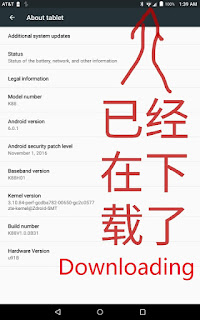

If no go, reboot.
If still no go, force update manually. Go to settings and AT&T Software Update, Check for Updates. If it goes through, all good. If not, saying "try again after 24 hours", then you need to change your phone's date one day ahead (tomorrow). Then reboot, wait for a while for it to auto update. If no go, try manually update again. If fails again, repeat.
You have to update to B29 or B33, to solve the touch problem.

First thing first, you must insert an active SIM card that uses AT&T network, such as H2O or AT&T prepaid (goPhone). You don't need to enable data, you can disable it, but you should use AT&T's APN.

Now connect your tablet to Internet via WiFi. Wait for a while for the auto update to start. Once started, you can see downloading activity in the WiFi icon:


If no go, reboot.
If still no go, force update manually. Go to settings and AT&T Software Update, Check for Updates. If it goes through, all good. If not, saying "try again after 24 hours", then you need to change your phone's date one day ahead (tomorrow). Then reboot, wait for a while for it to auto update. If no go, try manually update again. If fails again, repeat.
You have to update to B29 or B33, to solve the touch problem.

How dual-SIM phone work
Dual-SIM phones are not new, but until recently they were not good enough for both voice and data. The ZTE Axon 7 is the one that represents the new generation of dual-SIM phones.
An alternative is the Le S3 for about $150. It lacks some Verizon bands though and it cannot make calls with a Verizon SIM; LTE data only. The Mini version of the Axon 7 is very similar to the Le S3 on these regards; so is the Le Pro 3.
With such a dual-SIM phone, you can use the cheapest or best services for voice and data separately. For example, you can use a Tracfone or ExpoMobile SIM for very cheap and good voice calls on Verizon network while using a T-Mobile SIM for data. You may also use a Truephone SIM for free voice calls and text while using another SIM for data on T-Mobile, Verizon or AT&T. Such a dual-SIM phone is also extremely handy when you travel in another country including China.
Two big issues with Le S3
An alternative is the Le S3 for about $150. It lacks some Verizon bands though and it cannot make calls with a Verizon SIM; LTE data only. The Mini version of the Axon 7 is very similar to the Le S3 on these regards; so is the Le Pro 3.
With such a dual-SIM phone, you can use the cheapest or best services for voice and data separately. For example, you can use a Tracfone or ExpoMobile SIM for very cheap and good voice calls on Verizon network while using a T-Mobile SIM for data. You may also use a Truephone SIM for free voice calls and text while using another SIM for data on T-Mobile, Verizon or AT&T. Such a dual-SIM phone is also extremely handy when you travel in another country including China.
Two big issues with Le S3
Friday, May 12, 2017
Netgear N300, a good router for $17
My old D-Link DIR615 finally decided to quit after many years and recently I had to restart it daily. Saw some $17 routers in Walmart, Netgear and Belkin, and decided to give them a try. I grabbed the last Netgear N300, model WNR2000v5, while many Belkin's were still there.

Setup was extremely easy and configuration was all done by itself. All I did was open "www.routerlogin.net" on my computer to confirm that I want it as an AccessPoint. I always use a netbook as a flexible and powerful router and home server for everything.
Much faster and better coverage than before. Now I can watch local HDTV stations over WiFi smoothly. Wish I had done this earlier.

It is a very small box standing up. No extruding antennas. The case is full of heat-dispense holes, ice cold to touch, a good sign of many years of smooth servicing.

Although insanely cheap, it has a power button! saving the hassle to unplug and replug the power in case a reboot is needed. Even more incredible, a WiFi on/off button too, above the WPS button.

In Chinese:
用了多年的D-Link终于开始不稳定了,需要每天重启一下。在Walmart看到Netgear和Belkin的N300都是$17,就捡了一个回来。Belkin还有一堆,Netgear只剩最后一个,所以挑了Netgear。
设置非常简单,我只启用了Access Point模式,然后全是它自己设定。
比以前快多了,覆盖也广多了。以前看当地高清台(MEPG2)时很卡,现在完全流畅了,后悔没早点换掉。
很小,立着,不占地方,天线没在外面。盒子上几乎全是散热孔,一点都不热,冰凉的,应该能多用几年。这么便宜的东西,居然还有个电源开关!需要重启的时候不用拔电源。甚至还有一个WiFi开关!当然WPS按钮也有。

Setup was extremely easy and configuration was all done by itself. All I did was open "www.routerlogin.net" on my computer to confirm that I want it as an AccessPoint. I always use a netbook as a flexible and powerful router and home server for everything.
Much faster and better coverage than before. Now I can watch local HDTV stations over WiFi smoothly. Wish I had done this earlier.

It is a very small box standing up. No extruding antennas. The case is full of heat-dispense holes, ice cold to touch, a good sign of many years of smooth servicing.

Although insanely cheap, it has a power button! saving the hassle to unplug and replug the power in case a reboot is needed. Even more incredible, a WiFi on/off button too, above the WPS button.


In Chinese:
用了多年的D-Link终于开始不稳定了,需要每天重启一下。在Walmart看到Netgear和Belkin的N300都是$17,就捡了一个回来。Belkin还有一堆,Netgear只剩最后一个,所以挑了Netgear。
设置非常简单,我只启用了Access Point模式,然后全是它自己设定。
比以前快多了,覆盖也广多了。以前看当地高清台(MEPG2)时很卡,现在完全流畅了,后悔没早点换掉。
很小,立着,不占地方,天线没在外面。盒子上几乎全是散热孔,一点都不热,冰凉的,应该能多用几年。这么便宜的东西,居然还有个电源开关!需要重启的时候不用拔电源。甚至还有一个WiFi开关!当然WPS按钮也有。
Tuesday, April 25, 2017
NIkon D3300 Shutter Shock
Small compact cameras suffer from shutter shock. Mirroless cameras now have solved this issue by using electronic first curtains. It is nice that Nikon makes small DSLR's like the D3300, but they should deal with this shutter shock issue.
If shutter speed is within 1/30 to 1/250, the images look slightly blurry. Not very bad, but noticeable. Because this is the mostly used shutter speed range, so you almost never get tack sharp images with D3300.
With the 18-55 VR II kit lens, these are shot at 1/15 and 1/320, respectively, and both are tack sharp:


But at 1/160, it is not as sharp as above:

Even at 1/30 and 1/250, the differences are still there:


With the 55-200 VR II kit lens, results are similar.
Tack sharp at 1/15 and 1/320:


The worst is around 1/60 - 1/80:

Compared to the 18-55, 1/250 and even 1/200 are not that bad:


As you see, the worst case is still not too bad and you may simply forget about this issue and just shoot at any shutter speed. But, if you want an image that's totally tack sharp, then avoid speeds from 1/30 to 1/250.
As long as you can avoid shutter shock, these kit lenses and D3300 produce excellent sharpness, very close to my Sony 35mm/1.8 on a5100, far beyond what an entry level kit usually suggests.
Some interesting discussions and reviews regarding shutter shock. D5300 and D5500 also have this issue.
If shutter speed is within 1/30 to 1/250, the images look slightly blurry. Not very bad, but noticeable. Because this is the mostly used shutter speed range, so you almost never get tack sharp images with D3300.
With the 18-55 VR II kit lens, these are shot at 1/15 and 1/320, respectively, and both are tack sharp:


But at 1/160, it is not as sharp as above:

Even at 1/30 and 1/250, the differences are still there:


With the 55-200 VR II kit lens, results are similar.
Tack sharp at 1/15 and 1/320:


The worst is around 1/60 - 1/80:

Compared to the 18-55, 1/250 and even 1/200 are not that bad:


As you see, the worst case is still not too bad and you may simply forget about this issue and just shoot at any shutter speed. But, if you want an image that's totally tack sharp, then avoid speeds from 1/30 to 1/250.
As long as you can avoid shutter shock, these kit lenses and D3300 produce excellent sharpness, very close to my Sony 35mm/1.8 on a5100, far beyond what an entry level kit usually suggests.
Some interesting discussions and reviews regarding shutter shock. D5300 and D5500 also have this issue.
Saturday, April 15, 2017
Turn any headphones into wireless
I picked up the Taotronics TT-BA08 among others for the following reasons:
- Up to 20 hours play time. Others are less than 10 hours, cannot serve a whole day.
- Very small and light at 1 oz, ideal to clip on headphones as showing in above video.
- Full control buttons for play/pause and volume/track.
- APT-X for CD quality audio.
- APT-X low latency (short delay). You can use two of these, one as transmitter and one as receiver, to watch TV with any of your favorite headphones.
- Playing while charging.
- Connect to two devices at the same time.
If your headphones have high impedance such as the Sennheiser HD600, you may give Creative Labs Sound Blaster E3 a try, supposed to drive 500 ohms.
If you want one that comes with a clip on it already and for free, Fry's is selling a smartbean adapter, free after $15 rebate. Note that it does not have all the above features, but you have nothing to lose.
Tuesday, April 11, 2017
Tweaks of sports photos
No matter for whatever kind of photos, you must set your camera to:


- Always use single point focusing and the smallest focus area. If you let the camera to pick up a focus point for you, you simply waste your time.
- Always use either AF-S for still objects or AF-C for moving ones. AF-A sounds great but no manufacturer have implemented it well; so never use it.
- Always use A (aperture) mode. For one object or two such as portrait, use f/1.8 or the widest aperture; f/8 for massive objects such as landscape. If you use auto or P mode, you simply waste your time.
- Set a minimum shutter speed. For still objects, set it to 1/8 for standard lenses and 1/30 for telephoto lenses. For a party, 1/60 or so; for chasing a child, 1/125 or so; for sports, 1/250 or 1/500. Canon and Sony entry-level cameras do not have this option, this is why I bought the Nikon D3300 instead.

Now about sports:
- As already mentioned, use a minimum shutter speed of 1/250. Use 1/500 or even faster if lighting allows (without pushing ISO to too high).
- Use AF-C mode. When the moving object is approaching, half press down the shutter to make an initial focusing, hold the shutter and, once the object reaches your desired spot, press down fully the shutter to take the shot.
- If the object is moving from left to right, aiming at it, half press down the shutter to make an initial focusing, hold the shutter while moving camera to follow the object and, once the object reaches your desired spot, press down the shutter fully to take the shot.
- To isolate the object from the surroundings, use the longest focal length and widest aperture and go as close as possible.
Now about D3300 and its kit lenses:
- Like other Nikon cameras, D3300 also suffers from shutter shock between 1/30 and 1/125. So use either 1/30 or slower, or 1/125 or faster.
- Because the AF-S VR II lenses are sharp at all focal lengths including 200 mm (55 mm), so feel free to zoom all way in. But I found the best focus accuracy is achieved around 165 mm (45 mm), so I always try to use this focal length whenever possible, i.e., just a little bit back from the longest end.
- Focusing with the 55-200 lens is not so quick, especially when the focus was far away from the object. Therefore, it is almost mandatory to do aforementioned initial focusing while the object is approaching.
- Usually I focus on a person's eye, but for sports this is very difficult and often unnecessary. Because D3300 has only one cross-type focus point at the center, so I use it to focus on the center of the body. I keep my camera level - not looking down or up; so the person's face will be mostly in focus as well.
- Set camera's sharpening to 7 for sharp but not over sharp images.


Wednesday, April 5, 2017
Friday, March 31, 2017
Nikon D3300 focus problem and fix
They are on clearance in Walmart stores and I'm lucky enough to grab one at $299. Right out of box, photos are blurry, very. After some tests I confirmed front-focus problem with both lenses (18-55 and 55-200):


As both lenses do the same front-focus thing, it must be the camera body. So I enabled sensor clean procedure to lift up the mirror, turned the auto focus screw counterclockwise a little bit (about 10 degree or so), as instructed here.
Now both lenses focused at the center perfectly:


I used to be against to DSLR, because they were big, heavy and expensive. Things have changed in recent years, they have been getting smaller, lighter and inexpensive, under the competition from mirrorless and smartphones. Their lenses are more and relative cheap.


As both lenses do the same front-focus thing, it must be the camera body. So I enabled sensor clean procedure to lift up the mirror, turned the auto focus screw counterclockwise a little bit (about 10 degree or so), as instructed here.
Now both lenses focused at the center perfectly:


I used to be against to DSLR, because they were big, heavy and expensive. Things have changed in recent years, they have been getting smaller, lighter and inexpensive, under the competition from mirrorless and smartphones. Their lenses are more and relative cheap.
Subscribe to:
Posts (Atom)